
Creating 'We’re Hiring' Posts That Actually Work on Social Media
Most We Are Hiring posts vanish in the feed. The formats, visuals and calls-to-action that actually work on social media, platform by platform, with examples you can copy.
Navigating Social Recruiting with Confidence
A useful “We’re Hiring” post tells someone what the role is, where the work happens, what matters about the opportunity and how to apply. Start with the job title, location or remote arrangement, a confirmed benefit or pay range, and one clear application route. Use a photo or short video that shows the actual work, then adapt the format to the channel.
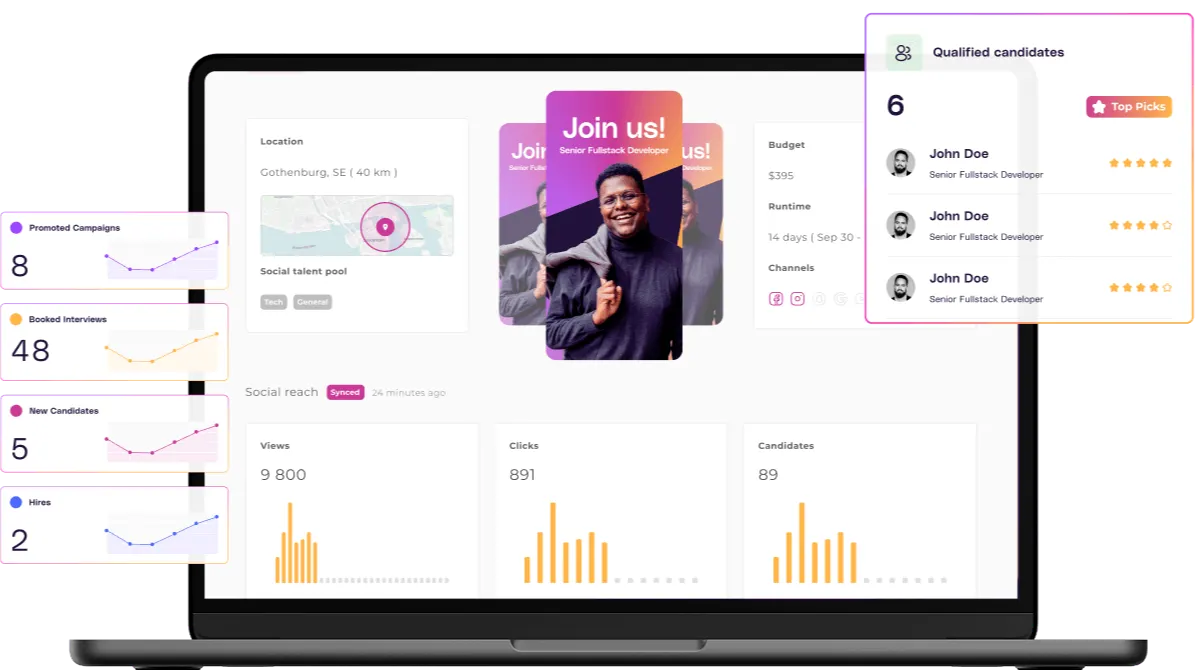
Social posts can introduce an opportunity to people who are not actively searching for a job. Adway’s social recruiting technology supports reaching people through social channels. Whether that interest becomes a relevant application depends on the role, the message and the application experience; publishing a post does not by itself establish faster hiring or better quality of hire.
For TA teams, the practical task is to make the opportunity understandable before asking someone to apply. Show the working environment, state essential requirements clearly and make the next step easy to find. Treat each post as a test of the message and application journey, then review the applications it produces.
What Makes a 'We’re Hiring' Post Stand Out?
A good 'We’re Hiring' post isn’t just a message but an invitation. The most effective posts are simple, visual, and speak directly to the person on the other side of the screen.
Let’s break it down.
First: visuals. Photos, short videos, or carousels grab attention. Choose images with intention, not generic stock. Showcase your real team, your real office, or even a quick video of someone in the role. These visuals humanise your brand and help candidates picture themselves on your team.
Next comes the copy. Keep it tight, benefit-driven, and on-brand. This isn’t the place for full job descriptions. Instead, highlight your EVP: what makes your workplace different, rewarding, or exciting to be part of. Think in headlines. What would make you pause while scrolling?
Clarity matters. Always include the essentials: the role title, location (if relevant), and a direct application link. If someone has to go digging for next steps, they’ll keep scrolling. Social recruiting works best when there’s a clear path from interest to action.
Avoid these common mistakes
-
Overstuffed text blocks. Posts with too much writing are easy to ignore. Instead, use emojis or bullet points to add rhythm and ease.
-
Missing or unclear CTAs. Every post should point towards action, “Apply here”, “DM us”, “See more at [link]”.
-
Overly corporate tone. Social media is personal by nature. Keep your voice human, confident, and clear.
Using polished visuals is smart, but authenticity wins. People connect with people.
Picking the Right Format for Every Platform
Each social media platform has its own pace and personality. If you copy and paste the same post everywhere, you’re missing the trick. Tailoring your message and format gives your hiring posts a better chance to land.
LinkedIn: Speak to professionals, but keep it warm
Use clear role titles. Keep the language professional but approachable. Include links to your careers page or ATS. Mention your company page.
A solid format for LinkedIn looks like:
“We’re hiring a Customer Success Manager in London. Love helping clients shine? Let’s talk. Apply here: [link]”.
Instagram: Tell your story visually
Use photos, carousels or short videos to show the role and working environment. For Instagram Stories, use a link sticker when it is available for your account, and test that it opens the intended vacancy. For a feed post, make the application route explicit, such as a clearly identified vacancy link in your profile. Do not leave candidates guessing which opening a general careers link refers to.
Facebook: Tap into networks
Write like you’re speaking to a friend. “Know someone who’d love this role? Tag them!” Share posts in relevant groups. Encourage employees to repost openings within their own circles.
TikTok: Keep it short, visual, and real
Use a short video to show the actual work, introduce a colleague or explain a role requirement. Add readable captions and a clear next step. Test the length and style against the applications each version produces, and use audio approved for the account and intended use.
A quick don’t list
-
Don’t post the same message without adjusting for tone or format.
-
Don’t ignore platform dimensions, text limits, or character lengths.
-
Don’t forget to engage with the comments. A post is only half the work, being responsive matters.
Check the post before publishing
Use this checklist for an organic post or paid creative. For paid campaigns, also confirm the employment-ad settings and formats available for the intended market.
| Check | What to confirm |
|---|---|
| Role and location | The job title and working location or remote arrangement match the vacancy. |
| Practical details | Any pay, shift, contract or benefit statement is confirmed and consistent with the job description. |
| Requirements | Essential requirements are clear and distinguished from preferences. |
| Application route | The link or profile instruction leads to the specific open role and works on a phone. |
| Measurement | The team can distinguish a click, an application start and a successful submission wherever these events are tracked. |
The templates below are placeholders, not real vacancies or customer results. Replace every bracketed field and confirm the application route before publishing.
Grab-and-Go Template Ideas
When you hit a creative wall, templates make life easier. They save time, create consistency, and offer guardrails across TA or employer brand teams.
Template 1: Clean and professional
“Now hiring: [Job Title] at [Company]. Make an impact in [key message]. Apply now: [link]”
Template 2: Friendly and casual
“We’re growing, and we’d love to meet you! Click here to learn more: [link] or DM us with questions.”
Template 3: Visual-focus caption
“👀 A peek inside life at [Company]. We’re hiring! If [Job Title] sounds like your kind of role, let's start a conversation. Link in bio.”
Having a few go-to templates also helps keep brand voice consistent across channels, while giving flexibility for role-specific edits. They’re not scripts, they’re scaffolding. Feel free to evolve them with your team’s tone and goals.
Staying Consistent and Optimised
Getting attention online is tricky, even when you have a brilliant role on offer. That’s where consistency and optimisation play a huge role. Social recruitment isn’t a one-off blast. It’s always-on visibility.
Set a rhythm. Whether it's every week, every role, or every first Tuesday, make sure your audience gets used to seeing your posts. Over time, that builds familiarity and trust, and keeps you top of mind.
Preview the post and application journey on a phone before publishing. Check that role information is legible, the application route is easy to find and the form can be completed successfully.
And don’t forget inclusivity. Use plain language. Avoid buzzwords. Include alt text on visuals. Look at your imagery, is it diverse, welcoming, and real?
Keep the conversation going
Social recruiting isn’t set-and-forget. Follow up with people who comment or share. Reply to questions. This shows potential candidates you’re active, engaged, and human behind the scenes.
Track completed applications as well as clicks and engagement. Record the post or campaign source where your setup supports it, distinguish application starts from successful submissions, and review relevance against the same job requirements. Compare similar roles and measurement periods. Likes and clicks can help evaluate creative, but they do not establish application quality or hiring impact.
Avoid the trap of posting inconsistently or relying on boosted posts without a strategy. The more natural your content feels, the more it acts like an extension of your culture, not just an ad.
How Adway Supports Social Hiring at Scale
Adway supports teams that want to connect social recruitment advertising with their existing hiring workflow. Start by defining the roles to promote, the approved employer message and the application destination.
Adway’s Always-On Job Ads is designed to turn vacancies on a connected career site into social advertising. Confirm the channels, approval steps and campaign setup available for your team. For the operational steps, use our guide to turning approved job posts into paid social campaigns.
Check the journey from the ad to the application and into your recruiting system. Confirm which information is transferred, how the source is recorded and how the team handles incomplete or duplicate applications.
Judge the resulting applications against agreed role requirements. Keep applications awaiting review separate from reviewed, relevant applications, and assess hiring outcomes once the hiring process has progressed.
For commercial details, ask Adway to confirm the scope, media budget, service arrangements and terms for the proposed setup.
Use the examples in this guide as a starting point. Adapt the message to the real vacancy, check the application route on mobile and compare results before changing the creative or increasing spend.
Further reading
When manual posts stop scaling: what is programmatic social media job advertising, what is employer brand activation, and the 2026 programmatic social job advertising vendor comparison.
Related reading
-
AI Social Recruiting: Transforming Hiring Through Data and Efficiency
-
Social Sourcing in Modern Recruitment: Building Quality Pipelines Through Social Channels
-
Social Recruiting Software That Works with Your ATS
-
Social Recruitment Campaigns: Practical Approaches for
Want to see this in practice?